The unit arrives, the storm hits, and the fridge runs beautifully. Then someone turns on the tap, the pressure pump tries to start, and the whole thing shuts down with an overload beep. Or it runs fine all evening and dies at 2am, halfway through night one of a three-day outage.
Home Battery Backup Sizing NZ
Both failures come from the same place: buying on capacity alone. Home battery backup sizing in NZ needs two numbers, not one, and the arithmetic takes about ten minutes once you know which figures to use. Here’s how to do it properly.
The short version: two numbers decide your battery size
You need watts how much can run at once, including the surge when motors start and kilowatt-hours how long it all lasts. Get the watts wrong and appliances won’t start at all. Get the kWh wrong and everything works fine right up until it doesn’t.
Size the watts first. Capacity is the second decision, not the first.
kW vs kWh: the distinction behind most sizing mistakes
Watts (W) and kilowatts (kW) measure the rate of power draw at any instant. Watt-hours (Wh) and kilowatt-hours (kWh) measure the amount of energy stored or used over time. A battery’s inverter rating tells you what it can run; its capacity tells you for how long.
Think of a water tank. The tap’s flow rate is your wattage it decides whether you can fill a bucket quickly or only trickle. The tank’s volume is your kWh. A big tank with a narrow tap still can’t fill a bath in a hurry.
This is why two units with identical capacity can behave completely differently in your house.
Continuous watts, surge watts, and why motors matter
Anything with a motor or compressor fridge, freezer, water pump, garage door draws a brief spike of current at startup, often several times its running wattage. A pump that runs at 750W might pull 2,500W or more for a fraction of a second.
If your unit can’t supply that spike, the pump never starts. It doesn’t matter that it only needs 750W once it’s spinning.
Two practical NZ notes. A standard 10A socket here delivers up to about 2,300W at 230V, so that’s a ceiling on anything plugged into a wall outlet. And check the surge or peak rating on a spec sheet separately from the continuous rating they’re different numbers and only one of them is usually in the headline.
This is not the same as sizing your solar array
Panel sizing is a separate calculation in kW of generation, driven by your annual consumption and roof orientation. Battery backup sizing is driven by what you refuse to lose during an outage. They’re related but not interchangeable, and sizing one from the other is how people end up with mismatched systems.
Step 1: List your critical loads, not your whole house
Backup sizing starts with a short list of what genuinely matters when the power’s out usually food, water, light, communications and any medical equipment. Everything else is negotiable. Trying to back up an entire home is what produces $30,000 quotes for a problem that a fraction of that would solve.
Here are typical figures for New Zealand households. Treat them as starting estimates and check the rating plate on your own appliances, because models vary widely.
| Load | Running watts | Surge watts | Realistic use | Daily Wh (approx.) |
|---|---|---|---|---|
| Fridge-freezer (modern) | 100–150W | 600–1,200W | Cycles ~⅓ of the time | 800–1,200 |
| Chest freezer (garage) | 80–120W | 500–1,000W | Cycles ~⅓ of the time | 600–1,000 |
| Wi-Fi router + fibre ONT | 15–25W | — | Continuous | 350–500 |
| LED lighting (5 fittings) | 40W total | — | 5 hours | ~200 |
| Phone + laptop charging | 60–100W | — | 3 hours | 200–300 |
| TV | 60–100W | — | 3 hours | 200–300 |
| CPAP (no humidifier) | 30–60W | — | 8 hours | 250–500 |
| Water pressure pump | 600–1,000W | 2,000–3,500W | Short bursts | 400–1,000 |
| Septic / effluent pump | 400–800W | 1,500–3,000W | Short bursts | 200–500 |
| Usually excluded | ||||
| Heat pump | 500–1,500W | High | — | Very high |
| Electric hot water cylinder | ~3,000W | — | — | Very high |
| Kettle / toaster / microwave | 900–2,400W | — | Minutes | Short but heavy |
A fridge’s duty cycle is the detail people miss. It doesn’t draw 150W continuously the compressor cycles on and off, typically running around a third of the time in normal conditions. That’s why its daily figure is far lower than 150W × 24 would suggest.
The loads Kiwis forget
- Fibre ONT. Your internet connection needs mains power at your end. The network can be perfectly healthy while your house is offline.
- Water pressure pumps. No power, no water, if you’re on tank or bore supply. This is the single biggest surge load in most rural NZ homes.
- Septic and effluent pumps. Not optional after a couple of days.
- The second freezer. Usually in the garage, usually full, usually forgotten until it isn’t.
- Garage door opener. Not critical, but worth knowing it has a surge.
Step 2: Turn daily watt-hours into a target capacity
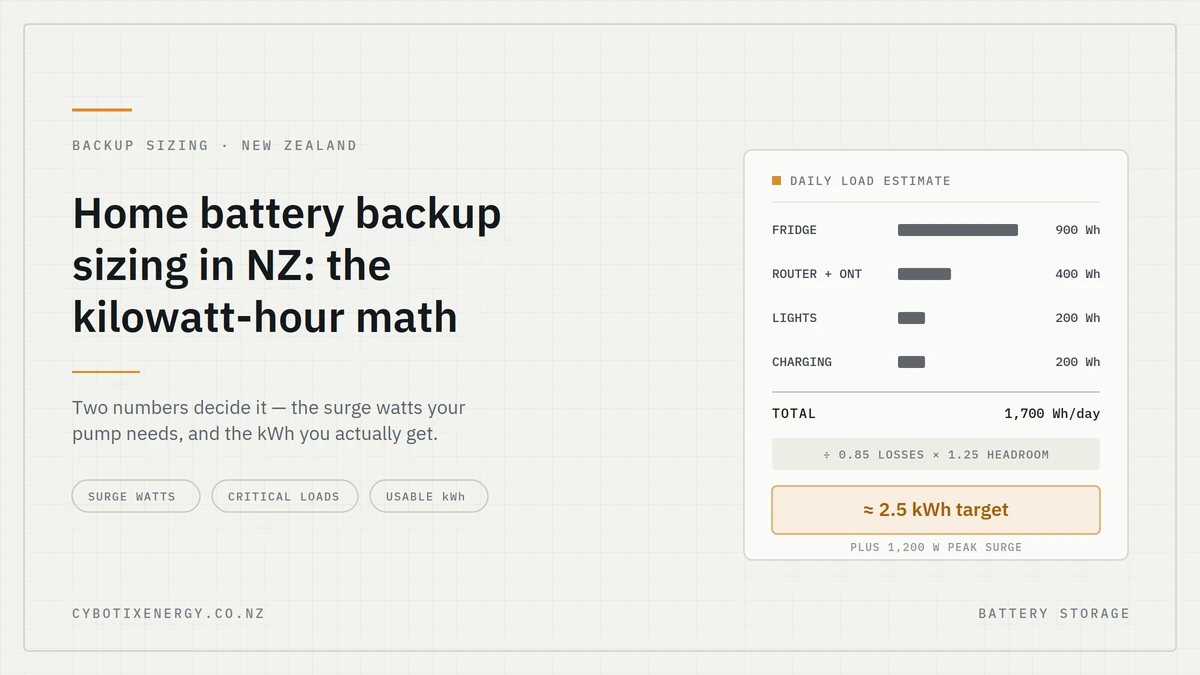
Add up the daily Wh of your critical loads, multiply by how many days you want to cover, divide by about 0.85 to allow for losses, then add roughly 25% headroom. The result is the nameplate capacity to shop for — not the figure you calculated first.
The formula:
(Daily Wh × outage days) ÷ 0.85 × 1.25 = target nameplate Wh
Worked example. Fridge 900Wh + router/ONT 400Wh + lights 200Wh + charging 200Wh = 1,700Wh a day. For one full day: 1,700 ÷ 0.85 = 2,000Wh, × 1.25 = 2,500Wh nameplate. So a unit in the 2.5–3kWh class, not the 2kWh one that matched your raw number.
Why nameplate Wh isn’t what reaches your appliances
Two things sit between the cells and your fridge. Converting DC to 230V AC costs energy — inverters typically run somewhere around 85–90% efficient depending on load. And while LiFePO4 chemistry allows a deep discharge, you don’t want to plan around scraping the very bottom.
Plan on roughly 80–90% of the sticker figure reaching your appliances. A 2,764.8Wh unit realistically delivers something like 2.3–2.5kWh at the socket. That’s not a defect it’s physics, and every brand is subject to it. Be wary of any runtime claim that appears to ignore it.
Add headroom for winter and age
Cold reduces the capacity a battery can deliver, and a chilly garage in July is exactly where many of these units live. Cells also lose some capacity over their service life. And outages have a habit of arriving during the week you’ve got visitors staying.
Sizing 20–30% above your bare calculation costs less than discovering the gap at 2am.
Step 3: Factor in recharging, because outages aren’t sealed boxes
If you can put energy back in during the outage, you don’t need to store the whole thing. Solar input changes the maths substantially and it’s the reason a well-matched panel setup can let you buy a smaller battery than the raw calculation suggests.
The catch is honesty about winter. A panel array rated at 400W won’t produce 400W on an overcast Wellington afternoon in July; output on heavily overcast days can drop to a small fraction of the rating, and short winter daylight hours compound it. Size your expectations on bad days, not good ones.
Run the numbers both ways. A household using 4.8kWh a day over a two-day outage needs around 14kWh of nameplate capacity with no recharge. If it can reliably harvest 2kWh a day, the net draw drops to 2.8kWh a day and the target falls to roughly 8kWh. That’s a large difference in both size and cost.
[PLACEHOLDER: original data — logged winter solar input from a real NZ installation. Even three or four days of kWh harvested, with the location, panel wattage and weather, would be the most valuable thing on this page and something no competitor has.]
Three worked examples for New Zealand homes
The numbers below use the table above and the formula from Step 2. Your own figures will differ; the method won’t.
Essentials only urban home, one-day outage
Fridge, internet, a few lights, device charging. Around 1,700Wh a day, with the fridge surge setting the wattage requirement at roughly 1,200W peak.
Target: about 2.5kWh nameplate, 1,000W+ continuous inverter.
Comfort tier family home, two-day storm outage
Adds the garage freezer, TV, laptops and more lighting. Around 3,200Wh a day, peak demand still modest at roughly 1,500W unless you’re running a microwave.
Target: about 9.4kWh nameplate for two days with no recharge or roughly 5–6kWh if you can harvest 1.5kWh a day from panels.
Rural property with a water pump two-day outage
Fridge, freezer, internet, lights, pressure pump, septic pump. Around 4,800Wh a day but the deciding number here is the 3,000W+ surge from the pump.
Target: about 14kWh nameplate without recharge, or roughly 8kWh with modest solar input. Note what’s actually driving this household’s purchase: it needs a bigger inverter before it needs a bigger battery. A large-capacity unit with a weak surge rating won’t start the pump at all.
Matching the maths to real capacity
Once you have a target figure, you’re comparing capacity classes rather than brand claims. The table below maps the three tiers to hardware, using current NZD pricing including GST.
| Tier | Continuous / surge needed | Target nameplate | Example configuration | Approx. cost per usable kWh |
|---|---|---|---|---|
| Essentials, 1 day | ~1,000W / 1,200W | ~2.5kWh | AC70P (864Wh, $1,049.95) covers part-day; step up for a full day | ~$1,430 |
| Comfort, 2 days | ~1,800W / 2,000W | ~9kWh | Apex 300 (2,764.8Wh, $4,066.10) + expansion batteries | ~$1,730 (host unit) |
| Rural + pump, 2 days | ~2,500W / 3,500W | ~8–14kWh | High-surge host unit + B300K expansions (2,764.8Wh, $2,879.66) | ~$1,225 (expansion) |
Expansion batteries vs buying bigger upfront
Arguments for starting smaller and expanding:
- Lower initial spend, and you learn your real consumption before committing
- Better cost per kWh on the additional capacity
- You can add after a real outage tells you what you actually needed
Arguments for buying the capacity upfront:
- One purchase, one price, no compatibility questions later
- Model availability changes; the matching expansion may not be stocked in two years
- Your inverter rating is fixed at purchase expansions add kWh, not watts
That last point is the one to weigh carefully. If your constraint is surge, no amount of added capacity solves it.
What the spec sheets don’t tell you
Published runtimes assume ideal conditions and a single steady load. Real households cycle compressors, run pumps unpredictably and open the fridge. Treat quoted hours as a best case, not a promise.
A few more things worth knowing:
- Switchover time matters if you’re protecting a desktop computer or medical device. Check whether the unit offers true UPS-style transfer and how many milliseconds it takes.
- Temperature affects output. A battery living in an unheated garage will deliver less on a cold morning than the spec suggests.
- Portable stations cost more per usable kWh than fixed home battery systems. That’s a genuine trade-off, and you should know it going in. What you get for the premium is no installation, no consenting, no electrician, and a unit you can take to the bach or lend to a neighbour.
- Pass-through charging lets you run loads while recharging, which is useful during intermittent supply.
Connecting to house wiring is electrician territory
Plugging appliances directly into a portable power station is fine and needs no special permission. Permanently wiring backup into your home’s circuits, or fitting any kind of transfer switching, is prescribed electrical work in New Zealand and must be done by a registered electrician.
Never attempt to feed power back into a wall socket. Backfeeding can energise the lines outside your house and endanger the crews working to restore your supply. It’s dangerous and non-compliant.
Your ten-minute sizing worksheet
Run these six steps and you’ll have a defensible target number to shop against.
- List your critical loads. Be ruthless — food, water, light, comms, medical.
- Note running watts for each, from the rating plate where you can find it.
- Find your single biggest surge. That number sets your minimum inverter and surge rating.
- Estimate daily Wh per load using realistic hours and duty cycles, then total them.
- Multiply by outage days, divide by 0.85, add 25%. That’s your nameplate target.
- Subtract any realistic daily solar harvest before step 5 if you have panels, using winter figures rather than summer ones.
Write down two numbers at the end: peak watts needed, and target kWh. Shop against both.
FAQs
How many kWh do I need to run my house during a power cut in NZ?
For essentials only fridge, internet, lights, charging most homes use roughly 1.5–2kWh a day, so a 2.5–3 kWh unit covers a day with headroom. Adding a freezer, TV and laptops pushes it to around 3kWh a day. Rural homes with a water pump often reach 4–5kWh a day.
Will a 2kWh battery run a fridge overnight?
Usually yes, with room to spare. A modern fridge-freezer uses roughly 800–1,200Wh over 24 hours because the compressor cycles rather than running constantly. The bigger question is whether the unit’s surge rating can handle compressor startup, which can briefly draw 600–1,200W.
What size battery do I need for a rural water pump?
The capacity matters less than the surge rating. Pressure pumps commonly need 2,000–3,500W momentarily to start, even though they run at 600–1,000W. Check your pump’s rating plate, then choose a unit whose surge rating comfortably exceeds it before you consider kWh at all.
How long do power outages usually last in New Zealand?
Most are resolved within hours. Storm damage on rural or bush-lined feeder lines can take considerably longer, and one to three days isn’t unusual after a significant event.
Can I run a heat pump off a portable power station?
Sometimes, but it’s rarely a sensible use of backup capacity. Heat pumps draw heavily and have a startup surge, and running one can consume a full day’s stored energy in a few hours. Most households are better served by warm clothing and keeping the fridge running.
Is it cheaper to buy one big battery or add expansion batteries later?
Expansion batteries typically cost less per usable kWh than the host unit, since you’re buying cells without another inverter. The catch is that expansions add capacity, not wattage if your problem is starting a pump, only a higher-rated host unit fixes it.
Do I need an electrician to use a home battery backup?
Not for plug-in use you can run appliances directly from the unit yourself. You do need a registered electrician for any permanent wiring into your home’s circuits or transfer switching, as that’s prescribed electrical work in New Zealand.