The power drops out at 7pm during a winter southerly. Within an hour the fridge is warming, the fibre modem is dark, and you’re cooking dinner by phone torch.
If you’ve started shopping for a fix, you’ve probably narrowed it to two BLUETTI units that cost about the same in New Zealand. The BLUETTI Elite 400 vs Apex 300 decision comes down to one question: do you want the biggest battery you can buy in a single box, or a smaller system you can grow into whole-home backup later?
This guide compares both on NZ-spec numbers (230V outlets, local pricing), not US reviews built around 120V sockets you’ll never use.
The Short Answer: Elite 400 or Apex 300?
Buy the Elite 400 if you want the most stored energy in one box and don’t plan to add batteries. Buy the Apex 300 if you need more output, more outlets, double the rated battery life, or a path to whole-home backup. For most NZ households covering essentials through a one- or two-day outage, the Elite 400 is the simpler purchase.
Pick the Elite 400 if:
- You want roughly 40% more capacity out of the box (3,840Wh vs 2,764.8Wh).
- You’d rather wheel the unit between rooms than install anything.
- Your outage plan is fridge, Wi-Fi, lights and phones, not the whole house.
Pick the Apex 300 if:
- You run heavier loads together, such as a kettle and microwave at once.
- You want to add expansion batteries as budget allows.
- You plan to cycle the battery often, for example storing solar each day.
Spec-by-Spec Comparison (NZ 230V Models)
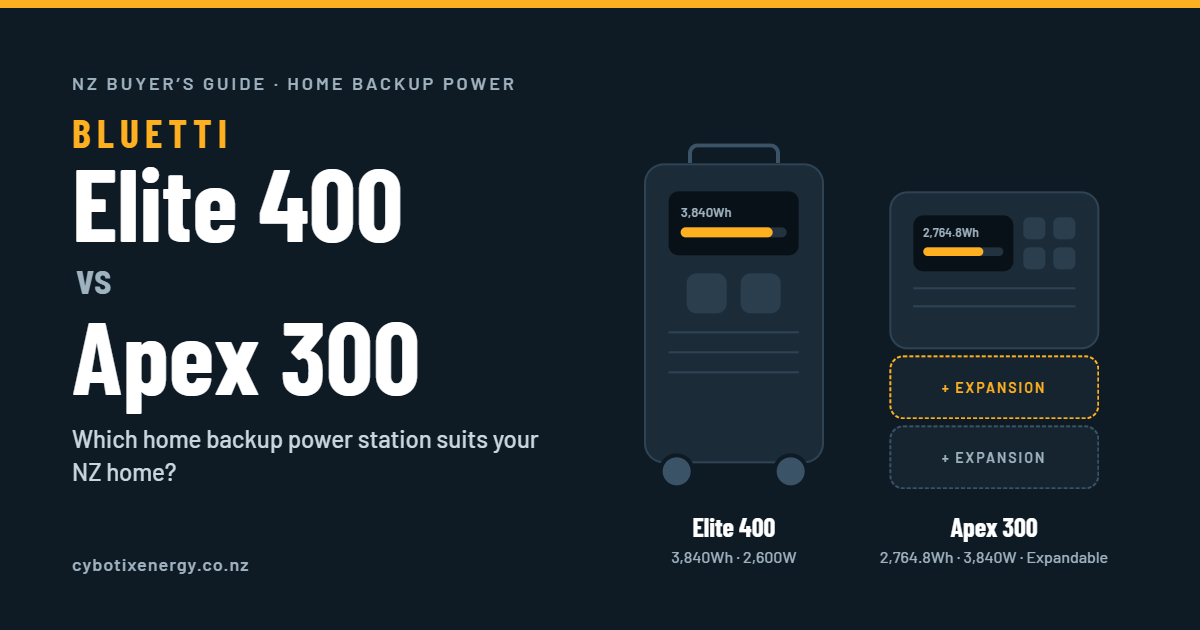
The Elite 400 wins on stored energy. The Apex 300 wins on output, outlets, solar input, cycle life and expandability. These are the 230V specs sold in New Zealand, which differ from the US versions most online reviews test.
| Spec | BLUETTI Elite 400 | BLUETTI Apex 300 |
|---|---|---|
| Battery capacity | 3,840Wh LiFePO4 | 2,764.8Wh LiFePO4 |
| Expandable | No | Yes, with B300K packs (up to 58kWh across three parallel units) |
| Continuous output | 2,600W | 3,840W |
| Lifting / surge power | 3,900W lifting, 5,200W surge | 7,680W lifting |
| AC outlets (230V) | 2 | 4 |
| USB-C / USB-A | 2 × 100W / 2 × 15W | 2 × 100W / 2 × 15W |
| UPS switchover | 15ms | 20ms or less |
| Rated cycles to 80% | 3,000+ | 6,000+ |
| AC charging | 2,300W, 0–80% in about 1.8 hours | 2,300W standard; up to 3,840W with Hub A1 |
| Solar input | 1,000W | 2,400W (2 × 1,200W) |
| Weight | 39kg, built-in wheels and telescopic handle | 38kg, carry handles |
| Typical NZ retail price (Oct 2026) | ~NZ$5,000–5,150 | ~NZ$4,200–4,900 |
What the numbers mean in practice
Power stations lose roughly 10–15% to inverter losses. That leaves around 3.3kWh usable from the Elite 400 and about 2.4kWh from the Apex 300.
A typical NZ essentials load looks like this:
- Fridge-freezer: 1–1.5kWh a day
- Fibre modem and router: about 0.3kWh a day
- LED lighting for an evening: about 0.2kWh
- Phones and a laptop: about 0.2kWh
At around 2kWh a day, the Elite 400 covers about a day and a half. The Apex 300 covers about a day before you need sun, a generator or more batteries.
Output matters for cooking. The Elite 400’s 2,600W handles a standard NZ kettle or a microwave, one at a time. The Apex 300’s 3,840W lets you run both together.
BLUETTI Elite 400 Review: One Big Battery, No Upgrades
The Elite 400 is the most capacity BLUETTI fits in a single rolling unit, and it’s easy to live with. Its weak spots are the output layout and the fixed size. You get what’s in the box, forever.
The design leans into portability. At 39kg it’s a two-person lift, but the wheels and telescopic handle mean one person can roll it from the garage to the kitchen during an outage. That matters more than spec sheets suggest when the lights are off.
Pros and cons
Pros
- 3,840Wh in one unit, with nothing to connect or configure
- Wheels and a pull handle, unusual at this capacity
- 15ms UPS switchover keeps a modem and fridge running through a cut
- Combined AC and solar charging up to 3,300W, reaching 80% in about an hour
Cons
- Only two 230V AC outlets on the NZ model, so you’ll lean on a quality power board
- No battery expansion, now or later
- 3,000 rated cycles, half the Apex 300’s rating
- 1,000W solar input limits how fast panels can refill it
Real-world runtime
With a fridge-freezer, router, a few LED lights and device charging, expect around 36 hours from a full charge. Add a 1,000W heater for two hours each evening and that drops to under a day.
Here’s how that estimate works for a typical NZ household’s essentials:
| Load | Approx. daily use |
|---|---|
| Fridge-freezer | 1.2kWh |
| Fibre modem and router | 0.3kWh |
| Six LED bulbs, evening use | 0.2kWh |
| Phones and a laptop | 0.2kWh |
| Total | 1.9kWh |
With about 3.3kWh usable after inverter losses, that works out to 1.5–1.7 days. A fridge opened often, or a warm kitchen, pushes it towards the lower end.
BLUETTI Apex 300 Review: A Modular Path to Whole-Home Backup
The Apex 300 is the base unit of a system rather than a finished product. On its own it stores less than the Elite 400, but it delivers more power, lasts twice as many rated cycles, and grows as your needs do.
How expansion works
Each B300K expansion pack adds another 2,764.8Wh, the same as the base unit. You can stack up to six packs on one Apex 300. You can also run up to three Apex 300 units in parallel for 11.52kW of output and up to 58kWh of storage.
Few NZ homes need anything close to that ceiling. The practical sweet spot is one Apex 300 plus one or two B300K packs, which gives roughly 5.5–8.3kWh. That’s enough to run essentials for two to four days, or to carry a home with solar through the night.
Pros and cons
Pros
- 3,840W continuous output and 7,680W lifting mode for heavy resistive loads
- Four 230V AC outlets
- 6,000+ rated cycles, suited to daily solar cycling
- 2,400W solar input per unit
- Grows with you, so a smaller first purchase isn’t wasted
Cons
- Less capacity than the Elite 400 at a similar price
- No built-in wheels; at 38kg you’ll want a trolley or a fixed spot
- Full-speed 3,840W AC charging needs the optional Hub A1
- Total cost climbs quickly as you add batteries
What US reviews get wrong for NZ buyers
Many Apex 300 reviews praise its 120V/240V split-phase output, NEMA outlets and 0ms UPS. Those features belong to the North American model.
The NZ unit is a 230V single-phase design with four standard NZ outlets and a UPS switchover of 20ms or less. That’s still fine for fridges, modems and most computers. Just don’t buy it expecting the features in a US YouTube review.
Apex 300 Price NZ vs Elite 400 Price NZ: What You Pay per kWh
On upfront cost per stored kWh, the Elite 400 is cheaper. Over the battery’s rated life, the Apex 300 works out cheaper per kWh delivered, because it’s rated for twice as many cycles. Which number matters depends on how often you’ll actually use it.
| Measure | Elite 400 | Apex 300 |
|---|---|---|
| Typical NZ price (Oct 2026) | ~NZ$5,000–5,150 | ~NZ$4,200–4,900 |
| Upfront cost per Wh | ~NZ$1.30–1.34 | ~NZ$1.52–1.77 |
| Rated lifetime energy (capacity × cycles) | ~11,500kWh | ~16,600kWh |
| Cost per lifetime kWh | ~NZ$0.43–0.45 | ~NZ$0.25–0.30 |
The lifetime figures are a ceiling, not a promise. Capacity fades gradually, and a unit that only covers a few outages a year will age out by calendar time long before it uses its cycles.
So the practical rule is simple:
- Occasional outage backup: upfront cost per Wh matters most, which favours the Elite 400.
- Daily solar storage or off-grid use: cycle life matters most, which favours the Apex 300.
Prices move with promotions, so check current BLUETTI pricing at Cybotix Energy before you compare, including bundles with solar panels or expansion batteries.
Best BLUETTI for Home Backup: Match the Unit to Your Situation
The best BLUETTI for home backup is the one sized to your actual loads and how you’ll connect it. Here’s how the two compare for common NZ situations.
| Your situation | Better fit | Why |
|---|---|---|
| Apartment or rental, no wiring changes allowed | Elite 400 | Plug-in only, rolls between rooms, most energy per dollar |
| Rural property with long, frequent outages | Apex 300 + B300K | Add capacity over time and recharge from solar or a generator |
| Household relying on medical equipment such as CPAP | Either, sized for at least two nights | Both switch over fast enough for most devices; confirm with the device maker |
| Family home with rooftop solar | Apex 300 | Higher solar input and 6,000+ cycles suit daily use |
| Bach, caravan or boat | Elite 400 | Wheels, one box, no system to assemble |
| Planning whole-home battery backup | Apex 300 | The only one of the two that scales into a home system |
A quick sizing check: add up the watts of everything you’d run at once, then the watt-hours you’d use in a day. If your daily figure is under 3kWh and you’ll never want more, the Elite 400 does the job. If either number is likely to grow, start with the Apex 300.
Connecting a Power Station to Your Home Safely in New Zealand
You can use either unit straight away by plugging appliances into it, with no electrician needed. Powering your home’s circuits is different. That needs a changeover switch and inlet installed by a registered electrician, so the battery can never feed back into the grid.
There are three common ways to set it up:
- Plug-in only. Run extension leads from the power station to the fridge, modem and lamps. It’s simple and legal, and it suits both units.
- Changeover switch with an inlet. An electrician fits an inlet on the house and a switch that isolates selected circuits from the grid. You then power lights and wall sockets on those circuits from the battery.
- Integrated system. The Apex 300’s high-current AC port and BLUETTI’s hub accessories are designed for circuit-level backup. Have your electrician confirm the exact NZ-compliant setup before you buy accessories.
Never use a double-ended “male-to-male” lead to backfeed a wall socket. It’s illegal, and it can electrocute lines workers repairing the network during the very outage you’re riding out.
A changeover install typically involves:
- An electrician checking your switchboard and agreeing which circuits to back up
- Fitting an external inlet and a manual changeover switch
- Testing the setup, then issuing a Certificate of Compliance for the work
Get a written quote. The cost depends on your switchboard’s condition and how many circuits you want covered.
Solar Charging in NZ Conditions
The Apex 300 accepts 2.4 times more solar input than the Elite 400, at 2,400W versus 1,000W. In summer both refill comfortably. In a New Zealand winter, that gap decides whether you recover from an outage in a day or several.
Rated solar input assumes ideal sun. Real output from portable panels in NZ is lower, especially from May to August when the sun sits low and days are short. As a rough guide, a 1,000W portable array might deliver 2–3kWh on a clear winter day in the North Island, and less in Southland or under cloud.
What that means for each unit:
- Elite 400: with 1,000W of panels, a clear winter day may only recover half to two-thirds of its battery. Over a multi-day outage, you’ll slowly fall behind unless you cut loads.
- Apex 300: with more panels connected, you can put back more energy each day than you use, even in winter. That’s the difference between a backup battery and a self-sufficient system.
If solar recovery during long outages matters to you, the Apex 300 is the stronger choice. Panel placement and angle make a big difference too, so tilt portable panels steeply towards the north in winter.
Our Verdict
There’s no single winner. The Elite 400 is the better outage kit, and the Apex 300 is the better energy system. Choose based on whether your needs are fixed or growing.
If you want to buy once, wheel it out a few times a year and keep the fridge and Wi-Fi alive, the Elite 400 gives you more stored energy for less money and almost no learning curve. Its two AC outlets are the main thing you’ll notice day to day.
If you see backup power as the first step toward solar storage or whole-home backup, the Apex 300 is worth the smaller starting capacity. You’re paying for headroom: more output, longer cycle life, faster solar recovery, and room to add batteries later.
Our default advice for most NZ homes without solar is the Elite 400. For rural properties, solar homes and anyone planning ahead, it’s the Apex 300.
Frequently Asked Questions
Can the BLUETTI Elite 400 run a heat pump?
It can run many small-to-medium inverter heat pumps, which often draw well under its 2,600W limit once running. Check the rated input power on your unit’s label. At an average draw of 800W, a full Elite 400 lasts roughly four hours.
Is the Apex 300 worth it over the Elite 400?
It’s worth it if you need more than 2,600W at once, plan to add batteries, or will charge from solar most days. For occasional outage backup, the Elite 400 gives more capacity for similar money.
How long will a BLUETTI run my fridge in a power cut?
A typical NZ fridge-freezer uses 1–1.5kWh a day. On its own, the Elite 400 could run one for two to three days and the Apex 300 for one and a half to two days. Add other loads and that shortens.
Can I add batteries to the Elite 400 later?
No. The Elite 400 has a fixed 3,840Wh capacity and no expansion port. If you think you’ll want more storage later, the Apex 300 is the one to buy.
Do I need an electrician to connect a BLUETTI to my house?
Not for plugging appliances directly into it. To power your home’s wiring, you need a changeover switch and inlet installed by a registered electrician. Never backfeed through a wall socket.
What’s the best home backup power station in NZ?
It depends on your loads and plans. For simple essentials backup, a high-capacity single unit like the Elite 400 suits most homes. For whole-home battery backup in NZ, a modular system like the Apex 300 is the better starting point.
Get the Right Backup Before the Next Outage
Still weighing up the Elite 400 against the Apex 300? Tell us what you want to keep running and for how long, and we’ll help you size it properly. See current prices and bundles at Cybotix Energy, or get in touch through the site for sizing advice.